01 / 09
Tabbed Interface
Stop hunting through a pile of scattered OS windows to find the right shell. Keep every session in one clean tab bar, reorder by dragging, and switch context in a single click.
Wrangl treats workspaces as first-class citizens. Organize terminals by project with persistent sessions, snapshots, and a clean tabbed interface.
wrangl / sessions
one row per agent, grouped by project
storefrontclaudefixing checkout bugrunningclaude, running
payments-apicodexwriting refund testsrunningcodex, running
infrageminiplanning queue moduledonegemini, done
docs-siteclauderewriting install guiderunningclaude, running
mobile-appcodexbumping SDK versionrunningcodex, running
auth-serviceclaudereviewing token refreshwaitingclaude, waiting
data-pipelinegeminiprofiling slow jobrunninggemini, running
admin-uiclaudemigrating table componentrunningclaude, running
searchcodexindexing test fixturesdonecodex, done
billingclaudetracing invoice roundingrunningclaude, running
emailsgeminidrafting template testsrunninggemini, running
cli-toolscodexsplitting release scriptdonecodex, done
gatewayclaudetightening rate limitsrunningclaude, running
analyticsgeminicleaning event schemarunninggemini, running
onboardingclaudewiring signup flowwaitingclaude, waiting
inventorycodexadding stock sync retriesrunningcodex, running
notificationsclaudededuping push queuerunningclaude, running
reportsgeminiexporting monthly CSVdonegemini, done
web-appclaudesplitting settings pagerunningclaude, running
sdk-jscodexgenerating API typesrunningcodex, running
design-systemclaudeauditing focus statesrunningclaude, running
+ 78 more sessions
100 agents. one window.
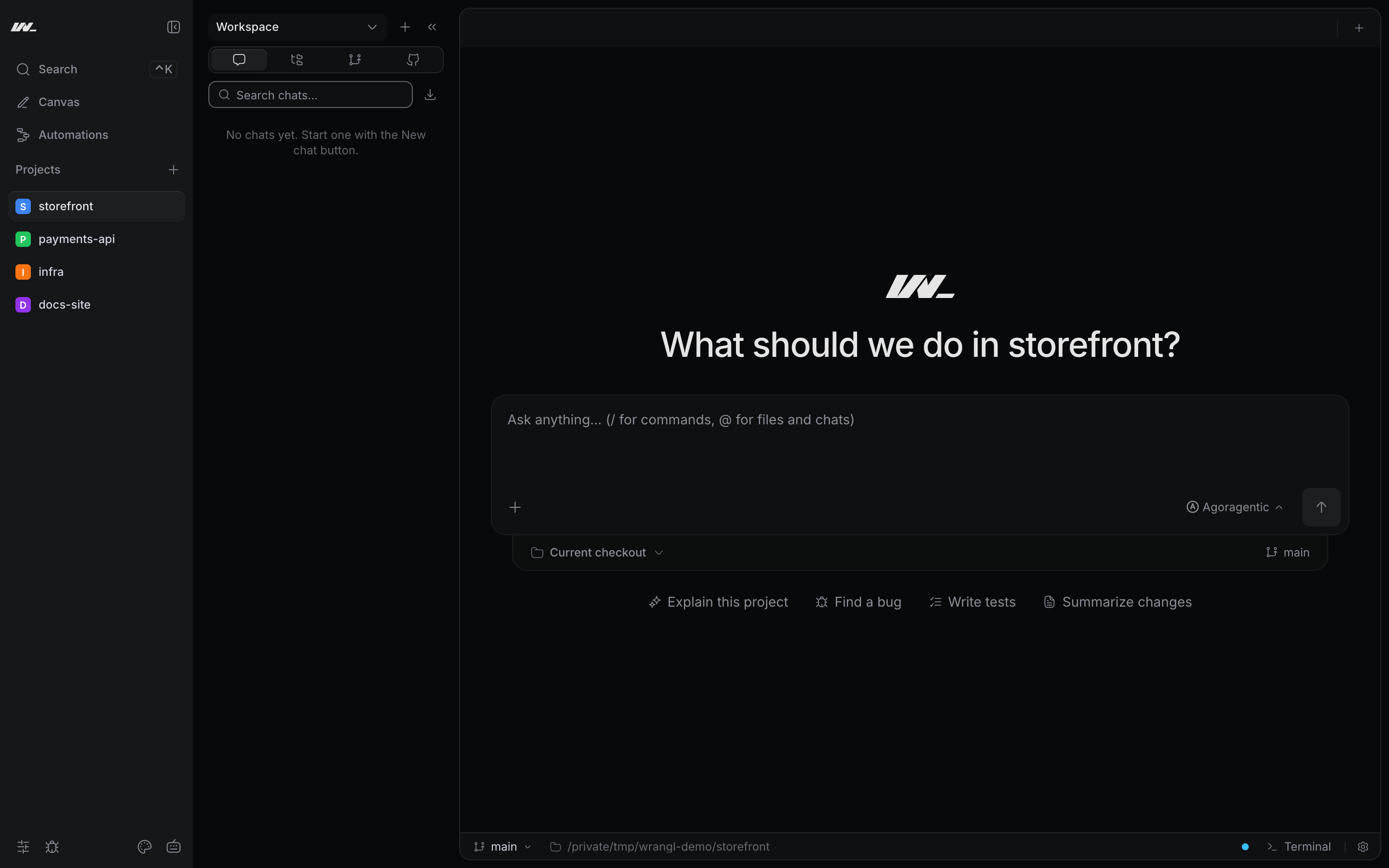
# the app
A real screenshot: four projects in the sidebar, the agent prompt open.
# features
Terminals, editors, browsers, and annotations — organized by project.
01 / 09
Stop hunting through a pile of scattered OS windows to find the right shell. Keep every session in one clean tab bar, reorder by dragging, and switch context in a single click.
02 / 09
Switching between PowerShell, WSL, and Git Bash usually means remembering paths and editing configs. Wrangl detects your installed shells for you, so the right environment is always one click away.
03 / 09
Juggling three projects should not mean three sets of mismatched terminals. Wrangl groups every session, directory, and setting under the project it belongs to, so switching projects restores the exact context you left.
04 / 09
Alt-tabbing between a terminal, your code, and a browser breaks concentration. Split your workspace into resizable panes and keep everything you need to see in view at once.
05 / 09
Writing docs in one app and previewing in another breaks your flow. Wrangl renders markdown live as you type — headings, lists, tables, and Mermaid diagrams take shape side by side with your text, no save-and-refresh loop.
06 / 09
Reporting a UI bug usually means screenshots, arrows, and a long chat thread. Browse inside your workspace, mark up exactly what is wrong, and export a structured report your team can act on.
07 / 09
Memorizing git commands for routine work slows everyone down. Stage, commit, amend, and push from a visual panel, and read your branch history as a graph without leaving the terminal.
08 / 09
Checking out a second branch normally means stashing work or cloning the repo again. Open a worktree as its own sub-project and work on multiple branches in parallel, each with isolated terminals.
09 / 09
Reaching for the mouse to switch projects or run an action adds up fast. Open the command palette and jump anywhere — project-first ordering and pinning keep what you use most at your fingertips.
# and more
Beyond the headline features, Wrangl is packed with the everyday conveniences that keep you in flow.
Connect to remote machines and manage files over SFTP without leaving your workspace.
Browse your project tree, create and rename inline, and see changes the moment they hit disk.
Search across your whole project at native speed, powered by a bundled ripgrep sidecar.
Capture a full workspace layout and restore it later, so experiments never cost you your setup.
Look back across per-project and aggregate command history to find what you ran and when.
Get a desktop notification and a tab highlight when a long-running command finishes.
Record your own shortcuts and trigger app actions consistently from any focused surface.
Stay current with auto-updates that download in the background and install on confirm.
A GPU-accelerated renderer keeps the terminal smooth, with an automatic DOM fallback.
Per-project environment variables are stored securely and redacted when persisted.
Native builds for Windows, macOS, and Linux from one Tauri 2 codebase.
Color-code projects and tune terminal and UI preferences to match how you like to work.